模式概觀
到目前為止,我們談的 Agentic 模式主要圍繞在調度語言模型之間的互動,以及管理 Agent 內部工作流程的資訊流(Chaining、Routing、Parallelization、Reflection)。但 Agent 要真正有用、要能跟真實世界或外部系統互動,就需要使用工具(Tools)的能力。
Tool Use 模式通常透過一種叫 Function Calling 的機制實作,讓 Agent 能與外部 API、資料庫、服務互動,甚至執行程式碼。它讓 Agent 核心的 LLM 能根據使用者的請求或任務的當前狀態,決定何時、如何使用某個外部函式。
流程通常包含:
- 工具定義: 把外部函式或能力定義好、描述給 LLM 聽。描述內容包括函式的用途、名稱、接受的參數,以及參數的型別和說明。
- LLM 決策: LLM 收到使用者的請求和可用的工具定義。根據它對請求和工具的理解,LLM 判斷是否需要呼叫一個或多個工具來完成請求。
- 生成函式呼叫: 如果 LLM 決定用工具,它會生成一個結構化的輸出(通常是 JSON 物件),指明要呼叫的工具名稱,以及從使用者請求中抽取出來要傳入的引數(參數)。
- 工具執行: Agentic 框架或調度層攔截這個結構化輸出,找出被請求的工具,帶著給定的引數實際執行外部函式。
- 觀察/結果: 工具執行的輸出或結果回傳給 Agent。
- LLM 處理(可選但常見): LLM 把工具的輸出當作上下文,用它來組出給使用者的最終回應,或決定工作流程的下一步(可能是再呼叫另一個工具、進行反思,或給出最終答案)。
這個模式之所以是根本,在於它打破了 LLM 訓練資料的限制:讓模型能取得最新資訊、執行它內部做不到的計算、存取使用者專屬的資料,或觸發真實世界的行動。Function Calling 就是那座橋,把 LLM 的推理能力和外部海量的功能接在一起。
「Function Calling」這個詞貼切地描述了「呼叫特定、預先定義的程式函式」,但更寬廣的概念是「Tool Calling(工具呼叫)」。這個更廣的說法承認:Agent 的能力可以遠遠超出單純的函式執行。「工具」可以是傳統的函式,也可以是複雜的 API 端點、對資料庫的請求,甚至是發給另一個專門 Agent 的指令。從這個視角出發,我們可以想像更精密的系統:例如主 Agent 把複雜的資料分析任務委派給專門的「分析師 Agent」,或透過 API 查詢外部知識庫。用「Tool Calling」來思考,更能抓住 Agent 的完整潛力──在多樣的數位資源和其他智慧實體構成的生態系中扮演調度者。
LangChain、LangGraph、Google Agent Developer Kit(ADK)這些框架,都對定義工具、把工具整合進 Agent 工作流程提供了穩固的支援,通常會利用 Gemini 或 OpenAI 系列這類現代 LLM 原生的 Function Calling 能力。在這些框架的「畫布」上,你先定義工具,再設定 Agent(通常是 LLM Agent)讓它知道並能使用這些工具。
Tool Use 是打造強大、能互動、能感知外部世界的 Agent 的基石模式。
實際應用與使用情境
幾乎所有需要 Agent 超越「生成文字」、去執行動作或取得特定動態資訊的場景,都用得上 Tool Use 模式:
1. 從外部來源檢索資訊
存取即時資料,或 LLM 訓練資料裡沒有的資訊。
- 情境: 天氣 Agent。
- 工具: 一個接收地點、回傳當前天氣的天氣 API。
- Agent 流程: 使用者問「倫敦天氣如何?」,LLM 判斷需要天氣工具,帶著 “London” 呼叫工具,工具回傳資料,LLM 把資料整理成友善的回應。
2. 與資料庫和 API 互動
對結構化資料執行查詢、更新或其他操作。
- 情境: 電商 Agent。
- 工具: 查商品庫存、查訂單狀態、處理付款的 API。
- Agent 流程: 使用者問「產品 X 有貨嗎?」,LLM 呼叫庫存 API,工具回傳庫存數量,LLM 告訴使用者庫存狀態。
3. 執行計算與資料分析
使用外部計算機、資料分析函式庫或統計工具。
- 情境: 金融 Agent。
- 工具: 計算函式、股市資料 API、試算表工具。
- Agent 流程: 使用者問「AAPL 現在多少錢?如果我在 150 美元買了 100 股,潛在獲利是多少?」,LLM 呼叫股票 API 拿到現價,再呼叫計算工具算出結果,整理成回應。
4. 發送通訊
寄 email、傳訊息,或呼叫外部通訊服務的 API。
- 情境: 個人助理 Agent。
- 工具: 寄送 email 的 API。
- Agent 流程: 使用者說「寄封信給 John 講明天開會的事」,LLM 從請求中抽出收件人、主旨和內文,呼叫 email 工具。
5. 執行程式碼
在安全的環境中執行程式碼片段,完成特定任務。
- 情境: 程式助理 Agent。
- 工具: 程式碼直譯器(code interpreter)。
- Agent 流程: 使用者貼一段 Python 程式碼問「這段程式在做什麼?」,LLM 用直譯器工具執行程式碼並分析輸出。
6. 控制其他系統或裝置
與智慧家庭裝置、IoT 平台或其他連網系統互動。
- 情境: 智慧家庭 Agent。
- 工具: 控制智慧燈具的 API。
- Agent 流程: 使用者說「把客廳的燈關掉」,LLM 帶著指令和目標裝置呼叫智慧家庭工具。
Tool Use 就是讓語言模型從「文字生成器」蛻變成「能在數位或實體世界感知、推理、行動的 Agent」的關鍵(見圖 1)。
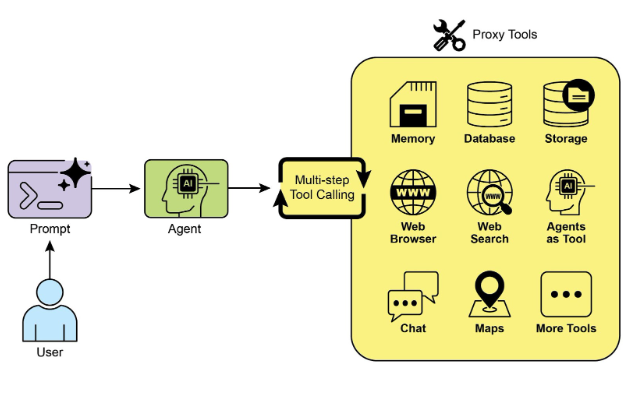
圖 1:Agent 使用工具的幾個例子。
實作範例(LangChain)
在 LangChain 框架中實作工具使用分兩個階段。首先定義一個或多個工具,通常是把現有的 Python 函式或其他 runnable 元件包裝起來。接著把這些工具綁定(bind)到語言模型上,讓模型在判斷需要呼叫外部函式來完成使用者查詢時,能生成結構化的工具使用請求。
下面的實作會示範這個原理:先定義一個模擬資訊檢索的簡單函式,再建構一個 Agent 並設定它根據使用者輸入來運用這個工具。執行這個範例需要安裝 LangChain 核心函式庫和對應模型供應商的套件,也需要完成所選語言模型服務的驗證(通常是在本機環境設定 API key)。
import os
import getpass
import asyncio
import nest_asyncio
from typing import List
from dotenv import load_dotenv
import logging

from langchain_google_genai import ChatGoogleGenerativeAI
from langchain_core.prompts import ChatPromptTemplate
from langchain_core.tools import tool as langchain_tool
from langchain.agents import create_tool_calling_agent, AgentExecutor


# UNCOMMENT
# Prompt the user securely and set API keys as environment variables
os.environ["GOOGLE_API_KEY"] = getpass.getpass("Enter your Google API key: ")
os.environ["OPENAI_API_KEY"] = getpass.getpass("Enter your OpenAI API key: ")

try:
    # A model with function/tool calling capabilities is required.
    llm = ChatGoogleGenerativeAI(model="gemini-2.0-flash", temperature=0)
    print(f"✅ Language model initialized: {llm.model}")
except Exception as e:
    print(f"🛑 Error initializing language model: {e}")
    llm = None


# --- Define a Tool ---
@langchain_tool
def search_information(query: str) -> str:
    """
    Provides factual information on a given topic. Use this tool to find answers to phrases
    like 'capital of France' or 'weather in London?'.
    """
    print(f"\n--- 🛠️ Tool Called: search_information with query: '{query}' ---")

    # Simulate a search tool with a dictionary of predefined results.
    simulated_results = {
        "weather in london": "The weather in London is currently cloudy with a temperature of 15°C.",
        "capital of france": "The capital of France is Paris.",
        "population of earth": "The estimated population of Earth is around 8 billion people.",
        "tallest mountain": "Mount Everest is the tallest mountain above sea level.",
        "default": f"Simulated search result for '{query}': No specific information found, but the topic seems interesting.",
    }
    result = simulated_results.get(query.lower(), simulated_results["default"])
    print(f"--- TOOL RESULT: {result} ---")
    return result


tools = [search_information]


# --- Create a Tool-Calling Agent ---
if llm:
    # This prompt template requires an `agent_scratchpad` placeholder for the agent's internal steps.
    agent_prompt = ChatPromptTemplate.from_messages([
        ("system", "You are a helpful assistant."),
        ("human", "{input}"),
        ("placeholder", "{agent_scratchpad}"),
    ])

    # Create the agent, binding the LLM, tools, and prompt together.
    agent = create_tool_calling_agent(llm, tools, agent_prompt)

    # AgentExecutor is the runtime that invokes the agent and executes the chosen tools.
    # The 'tools' argument is not needed here as they are already bound to the agent.
    agent_executor = AgentExecutor(agent=agent, verbose=True, tools=tools)


async def run_agent_with_tool(query: str):
    """Invokes the agent executor with a query and prints the final response."""
    print(f"\n--- 🏃 Running Agent with Query: '{query}' ---")
    try:
        response = await agent_executor.ainvoke({"input": query})
        print("\n--- ✅ Final Agent Response ---")
        print(response["output"])
    except Exception as e:
        print(f"\n🛑 An error occurred during agent execution: {e}")


async def main():
    """Runs all agent queries concurrently."""
    tasks = [
        run_agent_with_tool("What is the capital of France?"),
        run_agent_with_tool("What's the weather like in London?"),
        run_agent_with_tool("Tell me something about dogs."),  # Should trigger the default tool response
    ]
    await asyncio.gather(*tasks)


nest_asyncio.apply()
asyncio.run(main())
這段程式碼用 LangChain 函式庫和 Google Gemini 模型建立一個會呼叫工具的 Agent。它定義了一個 search_information 工具,模擬對特定查詢提供事實性答案:對 “weather in london”、“capital of france”、“population of earth” 有預先準備的回應,其他查詢則回傳預設回應。程式初始化一個 ChatGoogleGenerativeAI 模型(必須具備工具呼叫能力),並建立一個 ChatPromptTemplate 引導 Agent 的互動。create_tool_calling_agent 函式把語言模型、工具和 Prompt 組合成 Agent,再由 AgentExecutor 負責管理 Agent 的執行和工具的呼叫。非同步函式 run_agent_with_tool 用給定的查詢呼叫 Agent 並印出結果;main 函式準備多個查詢同時執行,測試 search_information 工具的特定回應和預設回應。最後 asyncio.run(main()) 執行所有 Agent 任務。程式碼在進行 Agent 設定和執行前,會先確認 LLM 是否初始化成功。
實作範例(CrewAI)
這段程式碼示範如何在 CrewAI 框架中實作 Function Calling(工具)。它建立一個簡單的場景:給 Agent 配一個查資訊的工具,具體示範用這個 Agent 和工具查詢模擬的股價。
# pip install crewai langchain-openai

import os
from crewai import Agent, Task, Crew
from crewai.tools import tool
import logging


# --- Best Practice: Configure Logging ---
# A basic logging setup helps in debugging and tracking the crew's execution.
logging.basicConfig(level=logging.INFO, format='%(asctime)s - %(levelname)s - %(message)s')


# --- Set up your API Key ---
# For production, it's recommended to use a more secure method for key management
# like environment variables loaded at runtime or a secret manager.
#
# Set the environment variable for your chosen LLM provider (e.g., OPENAI_API_KEY)
# os.environ["OPENAI_API_KEY"] = "YOUR_API_KEY"
# os.environ["OPENAI_MODEL_NAME"] = "gpt-4o"


# --- 1. Refactored Tool: Returns Clean Data ---
# The tool now returns raw data (a float) or raises a standard Python error.
# This makes it more reusable and forces the agent to handle outcomes properly.
@tool("Stock Price Lookup Tool")
def get_stock_price(ticker: str) -> float:
    """
    Fetches the latest simulated stock price for a given stock ticker symbol.
    Returns the price as a float. Raises a ValueError if the ticker is not found.
    """
    logging.info(f"Tool Call: get_stock_price for ticker '{ticker}'")
    simulated_prices = {
        "AAPL": 178.15,
        "GOOGL": 1750.30,
        "MSFT": 425.50,
    }
    price = simulated_prices.get(ticker.upper())
    if price is not None:
        return price
    else:
        # Raising a specific error is better than returning a string.
        # The agent is equipped to handle exceptions and can decide on the next action.
        raise ValueError(f"Simulated price for ticker '{ticker.upper()}' not found.")


# --- 2. Define the Agent ---
# The agent definition remains the same, but it will now leverage the improved tool.
financial_analyst_agent = Agent(
    role='Senior Financial Analyst',
    goal='Analyze stock data using provided tools and report key prices.',
    backstory="You are an experienced financial analyst adept at using data sources to find stock information. You provide clear, direct answers.",
    verbose=True,
    tools=[get_stock_price],
    # Allowing delegation can be useful, but is not necessary for this simple task.
    allow_delegation=False,
)


# --- 3. Refined Task: Clearer Instructions and Error Handling ---
# The task description is more specific and guides the agent on how to react
# to both successful data retrieval and potential errors.
analyze_aapl_task = Task(
    description=(
        "What is the current simulated stock price for Apple (ticker: AAPL)? "
        "Use the 'Stock Price Lookup Tool' to find it. "
        "If the ticker is not found, you must report that you were unable to retrieve the price."
    ),
    expected_output=(
        "A single, clear sentence stating the simulated stock price for AAPL. "
        "For example: 'The simulated stock price for AAPL is $178.15.' "
        "If the price cannot be found, state that clearly."
    ),
    agent=financial_analyst_agent,
)


# --- 4. Formulate the Crew ---
# The crew orchestrates how the agent and task work together.
financial_crew = Crew(
    agents=[financial_analyst_agent],
    tasks=[analyze_aapl_task],
    verbose=True  # Set to False for less detailed logs in production
)


# --- 5. Run the Crew within a Main Execution Block ---
# Using a __name__ == "__main__": block is a standard Python best practice.
def main():
    """Main function to run the crew."""
    # Check for API key before starting to avoid runtime errors.
    if not os.environ.get("OPENAI_API_KEY"):
        print("ERROR: The OPENAI_API_KEY environment variable is not set.")
        print("Please set it before running the script.")
        return

    print("\n## Starting the Financial Crew...")
    print("---------------------------------")

    # The kickoff method starts the execution.
    result = financial_crew.kickoff()

    print("\n---------------------------------")
    print("## Crew execution finished.")
    print("\nFinal Result:\n", result)


if __name__ == "__main__":
    main()
這段程式碼用 CrewAI 函式庫模擬一個金融分析任務。它定義了一個自訂工具 get_stock_price,模擬查詢預先定義的股票代號的股價:對有效代號回傳浮點數,對無效代號拋出 ValueError。程式建立一個名為 financial_analyst_agent 的 CrewAI Agent,角色是資深金融分析師,配備 get_stock_price 工具。接著定義任務 analyze_aapl_task,明確指示 Agent 用這個工具查 AAPL 的模擬股價;任務描述清楚交代了成功與失敗兩種情況的處理方式。然後組成一個 Crew,包含這位分析師 Agent 和這個任務;Agent 和 Crew 都開啟 verbose,執行時輸出詳細記錄。腳本主體在標準的 if __name__ == "__main__": 區塊裡用 kickoff() 方法啟動 Crew 的任務。開始前會檢查 OPENAI_API_KEY 環境變數是否已設定(Agent 運作的必要條件),最後把 Crew 執行的結果(也就是任務的輸出)印到主控台。程式碼也包含基本的 logging 設定,方便追蹤 Crew 的動作和工具呼叫;API key 用環境變數管理,但註明正式環境建議採用更安全的方法。簡言之,核心邏輯展示了如何在 CrewAI 中定義工具、Agent 和任務,組成一個協作的工作流程。
實作範例(Google ADK)
Google Agent Developer Kit(ADK)內建了一批原生整合的工具,可以直接納入 Agent 的能力。
Google 搜尋: 這類元件的代表就是 Google Search 工具。它是直通 Google 搜尋引擎的介面,讓 Agent 具備網頁搜尋、檢索外部資訊的能力。
from google.adk.agents import Agent as ADKAgent
from google.adk.runners import Runner
from google.adk.sessions import InMemorySessionService
from google.adk.tools import google_search
from google.genai import types
import nest_asyncio
import asyncio


# Define variables required for Session setup and Agent execution
APP_NAME = "Google Search Agent"
USER_ID = "user1234"
SESSION_ID = "1234"


# Define Agent with access to search tool
root_agent = ADKAgent(
    name="basic_search_agent",
    model="gemini-2.0-flash-exp",
    description="Agent to answer questions using Google Search.",
    instruction="I can answer your questions by searching the internet. Just ask me anything!",
    tools=[google_search],  # Google Search is a pre-built tool to perform Google searches.
)


# Agent Interaction
async def call_agent(query: str):
    """
    Helper function to call the agent with a query.
    """
    # Session and Runner
    session_service = InMemorySessionService()
    await session_service.create_session(
        app_name=APP_NAME,
        user_id=USER_ID,
        session_id=SESSION_ID,
    )

    runner = Runner(agent=root_agent, app_name=APP_NAME, session_service=session_service)

    content = types.Content(role='user', parts=[types.Part(text=query)])
    events = runner.run(user_id=USER_ID, session_id=SESSION_ID, new_message=content)

    for event in events:
        if event.is_final_response() and event.content:
            # Safely extract text from the final response
            if hasattr(event.content, "text") and event.content.text:
                final_response = event.content.text
            elif event.content.parts:
                final_response = "".join(
                    part.text for part in event.content.parts if getattr(part, "text", None)
                )
            else:
                final_response = ""
            print("Agent Response:", final_response)


nest_asyncio.apply()
asyncio.run(call_agent("what's the latest ai news?"))
這段程式碼示範如何用 Python 版 Google ADK 建立並使用一個基本的 Agent,它靠 Google 搜尋工具來回答問題。程式先匯入 IPython、google.adk 和 google.genai 的必要函式庫,定義應用名稱、使用者 ID 和 session ID 的常數。接著建立一個名為 basic_search_agent 的 Agent 實例,附上說明用途的 description 和 instruction,並設定使用 ADK 內建的 Google Search 工具。程式初始化一個 InMemorySessionService(見第 8 章)來管理 Agent 的 session,為指定的應用、使用者和 session ID 建立新 session。接著建立一個 Runner,把 Agent 和 session 服務連結起來;Runner 負責在 session 中執行 Agent 的互動。輔助函式 call_agent 簡化了「送查詢給 Agent、處理回應」的流程:函式內部把使用者的查詢包成 role 為 ‘user’ 的 types.Content 物件,呼叫 runner.run 方法並傳入使用者 ID、session ID 和新訊息。runner.run 回傳一串代表 Agent 動作和回應的事件,程式碼迭代這些事件找出最終回應,抽出其中的文字內容印到主控台。最後以查詢 “what’s the latest ai news?” 呼叫 call_agent,展示 Agent 實際運作。
程式碼執行: Google ADK 為專門任務提供了整合元件,其中包括動態執行程式碼的環境。built_in_code_execution 工具給 Agent 一個沙箱化的 Python 直譯器,讓模型能寫程式、跑程式來完成計算任務、操作資料結構、執行程序式腳本。這類功能對需要確定性邏輯和精確計算的問題至關重要──這些是單靠機率式的語言生成做不到的。
import os
import getpass
import asyncio
import nest_asyncio
from typing import List
from dotenv import load_dotenv
import logging

from google.adk.agents import Agent as ADKAgent, LlmAgent
from google.adk.runners import Runner
from google.adk.sessions import InMemorySessionService
from google.adk.tools import google_search
from google.adk.code_executors import BuiltInCodeExecutor
from google.genai import types


# Define variables required for Session setup and Agent execution
APP_NAME = "calculator"
USER_ID = "user1234"
SESSION_ID = "session_code_exec_async"


# Agent Definition
code_agent = LlmAgent(
    name="calculator_agent",
    model="gemini-2.0-flash",
    code_executor=BuiltInCodeExecutor(),
    instruction="""You are a calculator agent.
    When given a mathematical expression, write and execute Python code to calculate the result.
    Return only the final numerical result as plain text, without markdown or code blocks.
    """,
    description="Executes Python code to perform calculations.",
)


# Agent Interaction (Async)
async def call_agent_async(query: str):
    # Session and Runner
    session_service = InMemorySessionService()
    await session_service.create_session(app_name=APP_NAME, user_id=USER_ID, session_id=SESSION_ID)

    runner = Runner(agent=code_agent, app_name=APP_NAME, session_service=session_service)

    content = types.Content(role='user', parts=[types.Part(text=query)])
    print(f"\n--- Running Query: {query} ---")

    try:
        # Use run_async
        async for event in runner.run_async(user_id=USER_ID, session_id=SESSION_ID, new_message=content):
            print(f"Event ID: {event.id}, Author: {event.author}")

            if event.content and event.content.parts and event.is_final_response():
                for part in event.content.parts:  # Iterate through all parts
                    if getattr(part, "executable_code", None):
                        # Access the actual code string via .code
                        print(f"  Debug: Agent generated code:\n```python\n{part.executable_code.code}\n```")
                    elif getattr(part, "code_execution_result", None):
                        # Access outcome and output correctly
                        print(
                            "  Debug: Code Execution Result: "
                            f"{part.code_execution_result.outcome} - Output:\n{part.code_execution_result.output}"
                        )
                    elif getattr(part, "text", None) and not part.text.isspace():
                        # Also print any text parts found in any event for debugging
                        print(f"  Text: '{part.text.strip()}'")

                # --- Check for final response AFTER specific parts ---
                text_parts = [part.text for part in event.content.parts if getattr(part, "text", None)]
                final_result = "".join(text_parts)
                print(f"==> Final Agent Response: {final_result}")

    except Exception as e:
        print(f"ERROR during agent run: {e}")

    print("-" * 30)


# Main async function to run the examples
async def main():
    await call_agent_async("Calculate the value of (5 + 7) * 3")
    await call_agent_async("What is 10 factorial?")


# Execute the main async function
try:
    nest_asyncio.apply()
    asyncio.run(main())
except RuntimeError as e:
    # Handle specific error when running asyncio.run in an already running loop (like Jupyter/Colab)
    if "cannot be called from a running event loop" in str(e):
        print("\nRunning in an existing event loop (like Colab/Jupyter).")
        print("Please run `await main()` in a notebook cell instead.")
        # If in an interactive environment like a notebook, you might need to run:
        # await main()
    else:
        raise e  # Re-raise other runtime errors
這個腳本用 Google ADK 建立一個「寫程式並執行來解數學問題」的 Agent。它定義了一個被明確指示扮演計算機的 LlmAgent,配備 built_in_code_execution 工具。主要邏輯在 call_agent_async 函式:把使用者的查詢送給 Agent 的 runner,處理產生的事件。函式內部用非同步迴圈迭代事件,印出生成的 Python 程式碼和執行結果供除錯。程式碼仔細區分了這些中間步驟和帶著數值答案的最終事件。最後 main 函式用兩個不同的數學運算式執行 Agent,展示它的計算能力。
企業搜尋: 這段程式碼用 Python 的 google.adk 函式庫定義一個 Google ADK 應用,具體使用了 VSearchAgent──專門透過搜尋指定的 Vertex AI Search 資料存放區(datastore)來回答問題。程式初始化一個名為 q2_strategy_vsearch_agent 的 VSearchAgent,提供描述、使用的模型(“gemini-2.0-flash-exp”)和 Vertex AI Search datastore 的 ID;DATASTORE_ID 由環境變數提供。接著為 Agent 設定 Runner,用 InMemorySessionService 管理對話歷史。非同步函式 call_vsearch_agent_async 負責與 Agent 互動:接收查詢、建構訊息內容物件、呼叫 runner 的 run_async 方法把查詢送給 Agent,然後把 Agent 的回應即時串流到主控台,並印出最終回應的相關資訊,包括來自 datastore 的來源標註(source attributions)。程式包含錯誤處理,能捕捉 Agent 執行期間的例外,對 datastore ID 錯誤或權限不足等問題給出有用的提示。另一個非同步函式 run_vsearch_example 示範如何用範例查詢呼叫 Agent。主執行區塊先確認 DATASTORE_ID 已設定,再用 asyncio.run 執行範例,並處理在已有事件迴圈的環境(例如 Jupyter notebook)中執行的情況。
import asyncio
import os

from google.genai import types
from google.adk import agents
from google.adk.runners import Runner
from google.adk.sessions import InMemorySessionService


# --- Configuration ---
# Ensure you have set your GOOGLE_API_KEY and DATASTORE_ID environment variables
# For example:
# os.environ["GOOGLE_API_KEY"] = "YOUR_API_KEY"
# os.environ["DATASTORE_ID"] = "YOUR_DATASTORE_ID"
DATASTORE_ID = os.environ.get("DATASTORE_ID")


# --- Application Constants ---
APP_NAME = "vsearch_app"
USER_ID = "user_123"  # Example User ID
SESSION_ID = "session_456"  # Example Session ID


# --- Agent Definition (Updated with the newer model from the guide) ---
vsearch_agent = agents.VSearchAgent(
    name="q2_strategy_vsearch_agent",
    description="Answers questions about Q2 strategy documents using Vertex AI Search.",
    model="gemini-2.0-flash-exp",  # Updated model based on the guide's examples
    datastore_id=DATASTORE_ID,
    model_parameters={"temperature": 0.0},
)


# --- Runner and Session Initialization ---
runner = Runner(
    agent=vsearch_agent,
    app_name=APP_NAME,
    session_service=InMemorySessionService(),
)


# --- Agent Invocation Logic ---
async def call_vsearch_agent_async(query: str):
    """Initializes a session and streams the agent's response."""
    print(f"User: {query}")
    print("Agent: ", end="", flush=True)
    try:
        # Construct the message content correctly
        content = types.Content(role='user', parts=[types.Part(text=query)])

        # Process events as they arrive from the asynchronous runner
        async for event in runner.run_async(
            user_id=USER_ID,
            session_id=SESSION_ID,
            new_message=content,
        ):
            # For token-by-token streaming of the response text
            if hasattr(event, "content_part_delta") and event.content_part_delta:
                print(event.content_part_delta.text, end="", flush=True)

            # Process the final response and its associated metadata
            if event.is_final_response():
                print()  # Newline after the streaming response
                if getattr(event, "grounding_metadata", None):
                    print(
                        f"  (Source Attributions: "
                        f"{len(event.grounding_metadata.grounding_attributions)} sources found)"
                    )
                else:
                    print("  (No grounding metadata found)")
                print("-" * 30)
    except Exception as e:
        print(f"\nAn error occurred: {e}")
        print("Please ensure your datastore ID is correct and that the service account has the necessary permissions.")
        print("-" * 30)


# --- Run Example ---
async def run_vsearch_example():
    # Replace with a question relevant to YOUR datastore content
    await call_vsearch_agent_async("Summarize the main points about the Q2 strategy document.")
    await call_vsearch_agent_async("What safety procedures are mentioned for lab X?")


# --- Execution ---
if __name__ == "__main__":
    if not DATASTORE_ID:
        print("Error: DATASTORE_ID environment variable is not set.")
    else:
        try:
            asyncio.run(run_vsearch_example())
        except RuntimeError as e:
            # This handles cases where asyncio.run is called in an environment
            # that already has a running event loop (like a Jupyter notebook).
            if "cannot be called from a running event loop" in str(e):
                print("Skipping execution in a running event loop. Please run this script directly.")
            else:
                raise e
整體來說,這段程式碼提供了一個基本框架:打造一個利用 Vertex AI Search、根據 datastore 中儲存的資訊回答問題的對話式 AI 應用。它示範了如何定義 Agent、設定 Runner,以及在串流回應的同時非同步地與 Agent 互動。重點在於從特定的 datastore 檢索並綜合資訊,回答使用者的查詢。
Vertex Extensions: Vertex AI extension 是一種結構化的 API 包裝器,讓模型能連上外部 API,進行即時的資料處理和動作執行。Extensions 提供企業級的安全性、資料隱私和效能保證,可用於生成並執行程式碼、查詢網站、分析私有 datastore 的資訊等任務。Google 為常見情境提供了預建的 extensions(例如 Code Interpreter 和 Vertex AI Search),也支援自訂。Extensions 的主要好處是強大的企業控制能力,以及與其他 Google 產品的無縫整合。Extensions 和 Function Calling 的關鍵差異在執行方式:Vertex AI 會自動執行 extensions,而 Function Call 需要由使用者或客戶端手動執行。
速覽
問題: LLM 是強大的文字生成器,但它們天生與外部世界隔絕:知識是靜態的、受限於訓練資料,也沒有執行動作或取得即時資訊的能力。這個先天限制讓它們無法完成需要與外部 API、資料庫或服務互動的任務。沒有通往這些外部系統的橋,它們解決真實問題的用處就大打折扣。
解法: Tool Use 模式(通常透過 Function Calling 實作)為這個問題提供了標準化的解法。做法是用 LLM 能理解的方式,向它描述可用的外部函式(也就是「工具」)。根據使用者的請求,Agentic LLM 判斷是否需要工具,並生成一個結構化的資料物件(例如 JSON),指明要呼叫哪個函式、帶什麼引數。調度層執行這個函式呼叫、拿到結果,再回饋給 LLM。LLM 因此能把最新的外部資訊或動作的結果納入最終回應──等於真正有了行動能力。
經驗法則: 只要 Agent 需要突破 LLM 的內部知識、與外部世界互動,就用 Tool Use 模式。需要即時資料(查天氣、股價)、存取私有或專屬資訊(查公司資料庫)、精確計算、執行程式碼,或在其他系統觸發動作(寄 email、控制智慧裝置)的任務,都少不了它。
圖解:
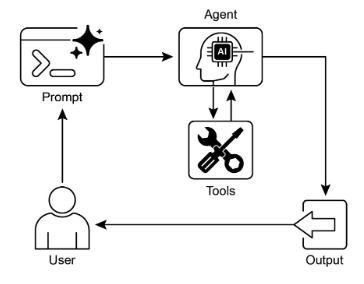
圖 2:Tool Use 設計模式。
重點回顧
- Tool Use(Function Calling)讓 Agent 能與外部系統互動、取得動態資訊。
- 它需要為工具定義清楚的描述和參數,讓 LLM 能理解。
- LLM 負責決定何時用工具,並生成結構化的函式呼叫。
- Agentic 框架負責實際執行工具呼叫,把結果回傳給 LLM。
- Tool Use 是打造能執行真實世界動作、提供最新資訊的 Agent 的必要條件。
- LangChain 用 @tool 裝飾器簡化工具定義,並提供
create_tool_calling_agent和 AgentExecutor 來建構會用工具的 Agent。 - Google ADK 內建了不少實用的工具,例如 Google Search、程式碼執行和 Vertex AI Search。
結語
Tool Use 模式是一個關鍵的架構原則,把大型語言模型的功能範圍擴展到文字生成之外。讓模型具備與外部軟體和資料來源對接的能力後,Agent 就能執行動作、進行計算、從其他系統檢索資訊。流程是:當模型判斷需要呼叫外部工具來完成使用者的查詢時,就生成一個結構化的請求。LangChain、Google ADK、CrewAI 這些框架提供了結構化的抽象和元件,讓外部工具的整合更容易:它們負責把工具規格呈現給模型,並解析模型隨後發出的工具使用請求。這大幅簡化了「能與外部數位環境互動並採取行動」的精密 Agentic 系統的開發。
參考資料
- LangChain Documentation (Tools): https://python.langchain.com/docs/integrations/tools/
- Google Agent Developer Kit (ADK) Documentation (Tools): https://google.github.io/adk-docs/tools/
- OpenAI Function Calling Documentation: https://platform.openai.com/docs/guides/function-calling
- CrewAI Documentation (Tools): https://docs.crewai.com/concepts/tools