AI Agent 要真正有效、有目的地行動,光會處理資訊或使用工具還不夠:它們需要明確的方向感,以及一個判斷自己「到底有沒有成功」的方法。這就是 Goal Setting and Monitoring(目標設定與監控)模式的用武之地:給 Agent 明確的目標去努力,並配備追蹤進度、判定目標是否達成的手段。
模式概觀
想想規劃一趟旅行。你不會憑空出現在目的地:你先決定要去哪裡(目標狀態)、弄清楚從哪裡出發(初始狀態)、考慮可用的選項(交通方式、路線、預算),然後排出一連串步驟:訂票、打包、前往機場或車站、上車、抵達、找住宿等等。這種一步一步、通常還要考慮依賴關係和限制條件的過程,本質上就是 Agentic 系統裡所說的規劃。
在 AI Agent 的脈絡中,規劃通常是 Agent 接下一個高層次目標後,自主(或半自主)地生成一系列中間步驟或子目標。這些步驟可以依序執行,也可以走更複雜的流程,過程中可能用到其他模式:工具使用、路由、Multi-Agent 協作。規劃機制可能涉及精密的搜尋演算法、邏輯推理,或者──越來越常見的──利用大型語言模型(LLM)的能力,基於訓練資料和對任務的理解,生成合理有效的計畫。
好的規劃能力讓 Agent 能處理「不是一步就能查完」的問題:應付多面向的請求、透過重新規劃來適應變化、調度複雜的工作流程。這是一個支撐許多進階 Agentic 行為的基礎模式,把單純的反應式系統,變成能主動朝明確目標推進的系統。
實際應用與使用情境
Goal Setting and Monitoring 模式對打造「能在複雜真實場景中自主、可靠運作」的 Agent 不可或缺。幾個實際應用:
- 客服自動化: Agent 的目標可能是「解決客戶的帳單問題」。它監看對話、查資料庫、用工具調整帳單。成功與否靠確認帳單已修正、客戶回饋正面來監控;問題沒解決就升級處理。
- 個人化學習系統: 學習 Agent 的目標可能是「提升學生對代數的理解」。它監控學生的練習進度、調整教材,追蹤正確率和完成時間等指標,學生卡關就換方法。
- 專案管理助理: Agent 的任務可能是「確保專案里程碑 X 在 Y 日期前完成」。它監控任務狀態、團隊溝通和資源可用性,發現延遲就示警,目標有風險就建議補救措施。
- 自動交易機器人: 交易 Agent 的目標可能是「在風險承受範圍內最大化投資組合收益」。它持續監控市場資料、當前投資組合價值和風險指標,條件符合目標就執行交易,觸及風險門檻就調整策略。
- 機器人與自駕車: 自駕車的首要目標是「安全地把乘客從 A 送到 B」。它持續監控環境(其他車輛、行人、號誌)、自身狀態(速度、油量)和路線進度,調整駕駛行為,安全又有效率地達成目標。
- 內容審核: Agent 的目標可能是「找出並移除平台 X 上的有害內容」。它監控進來的內容、套用分類模型,追蹤誤判率(false positive/negative)等指標,調整過濾標準,模糊案例則升級給人工審核。
對需要可靠運作、達成特定成果、適應動態環境的 Agent 來說,這個模式是根本──它提供了智慧自我管理所需的框架。
實作範例
為了說明 Goal Setting and Monitoring 模式,我們用 LangChain 和 OpenAI API 做一個範例。這個 Python 腳本描繪了一個自主的 AI Agent,專門生成和打磨 Python 程式碼。它的核心功能是為指定的問題產出解法,並確保符合使用者定義的品質基準。
它採用「目標設定與監控」模式:不是生成一次程式碼就了事,而是進入「生成 → 自我評估 → 改進」的迭代循環。Agent 的成功與否,由它自己的 AI 判斷來衡量:生成的程式碼是否達成了最初的目標。最終產出是一份打磨過、加了註解、可直接使用的 Python 檔案,是整個修煉過程的結晶。
相依套件:
pip install langchain_openai openai python-dotenv .env file with key in OPENAI_API_KEY理解這個腳本最好的方式,是把它想像成一位被指派到專案的自主 AI 程式設計師(見圖 1)。流程從你交給 AI 一份詳細的專案簡報開始──也就是它要解決的具體程式問題。
# MIT License
# Copyright (c) 2025 Mahtab Syed
# https://www.linkedin.com/in/mahtabsyed/

"""
Hands-On Code Example - Iteration 2
-  To illustrate the Goal Setting and Monitoring pattern, we have an example using LangChain and OpenAI APIs:

Objective: Build an AI Agent which can write code for a specified use case based on specified goals:
-  Accepts a coding problem (use case) in code or can be as input.
-  Accepts a list of goals (e.g., "simple", "tested", "handles edge cases")  in code or can be input.
-  Uses an LLM (like GPT-4o) to generate and refine Python code until the goals are met. (I am using max 5 iterations, this could be based on a set goal as well)
-  To check if we have met our goals I am asking the LLM to judge this and answer just True or False which makes it easier to stop the iterations.
-  Saves the final code in a .py file with a clean filename and a header comment.
"""

import os
import random
import re
from pathlib import Path

from langchain_openai import ChatOpenAI
from dotenv import load_dotenv, find_dotenv


# 🔐 Load environment variables
_ = load_dotenv(find_dotenv())
OPENAI_API_KEY = os.getenv("OPENAI_API_KEY")
if not OPENAI_API_KEY:
    raise EnvironmentError("❌ Please set the OPENAI_API_KEY environment variable.")

# ✅ Initialize OpenAI model
print("📡 Initializing OpenAI LLM (gpt-4o)...")
llm = ChatOpenAI(
    model="gpt-4o",  # If you dont have access to got-4o use other OpenAI LLMs
    temperature=0.3,
    openai_api_key=OPENAI_API_KEY,
)


# --- Utility Functions ---
def generate_prompt(
    use_case: str, goals: list[str], previous_code: str = "", feedback: str = ""
) -> str:
    print("📝 Constructing prompt for code generation...")
    base_prompt = f"""
You are an AI coding agent. Your job is to write Python code based on the following use case:

Use Case: {use_case}

Your goals are:
{chr(10).join(f"- {g.strip()}" for g in goals)}
"""
    if previous_code:
        print("🔄 Adding previous code to the prompt for refinement.")
        base_prompt += f"\nPreviously generated code:\n{previous_code}"
    if feedback:
        print("📋 Including feedback for revision.")
        base_prompt += f"\nFeedback on previous version:\n{feedback}\n"

    base_prompt += "\nPlease return only the revised Python code. Do not include comments or explanations outside the code."
    return base_prompt


def get_code_feedback(code: str, goals: list[str]) -> str:
    print("🔍 Evaluating code against the goals...")
    feedback_prompt = f"""
You are a Python code reviewer. A code snippet is shown below. Based on the following goals:

{chr(10).join(f"- {g.strip()}" for g in goals)}

Please critique this code and identify if the goals are met. Mention if improvements are needed for clarity, simplicity, correctness, edge case handling, or test coverage.

Code:
{code}
"""
    return llm.invoke(feedback_prompt)


def goals_met(feedback_text: str, goals: list[str]) -> bool:
    """
    Uses the LLM to evaluate whether the goals have been met based on the feedback text.
    Returns True or False (parsed from LLM output).
    """
    review_prompt = f"""
You are an AI reviewer.

Here are the goals:
{chr(10).join(f"- {g.strip()}" for g in goals)}

Here is the feedback on the code:
\"\"\"
{feedback_text}
\"\"\"

Based on the feedback above, have the goals been met?

Respond with only one word: True or False.
"""
    response = llm.invoke(review_prompt).content.strip().lower()
    return response == "true"


def clean_code_block(code: str) -> str:
    lines = code.strip().splitlines()
    if lines and lines[0].strip().startswith("```"):
        lines = lines[1:]
    if lines and lines[-1].strip() == "```":
        lines = lines[:-1]
    return "\n".join(lines).strip()


def add_comment_header(code: str, use_case: str) -> str:
    comment = f"# This Python program implements the following use case:\n# {use_case.strip()}\n"
    return comment + "\n" + code


def to_snake_case(text: str) -> str:
    text = re.sub(r"[^a-zA-Z0-9 ]", "", text)
    return re.sub(r"\s+", "_", text.strip().lower())


def save_code_to_file(code: str, use_case: str) -> str:
    print("💾 Saving final code to file...")

    summary_prompt = (
        f"Summarize the following use case into a single lowercase word or phrase, "
        f"no more than 10 characters, suitable for a Python filename:\n\n{use_case}"
    )
    raw_summary = llm.invoke(summary_prompt).content.strip()
    short_name = re.sub(r"[^a-zA-Z0-9_]", "", raw_summary.replace(" ", "_").lower())[:10]

    random_suffix = str(random.randint(1000, 9999))
    filename = f"{short_name}_{random_suffix}.py"
    filepath = Path.cwd() / filename

    with open(filepath, "w") as f:
        f.write(code)

    print(f"✅ Code saved to: {filepath}")
    return str(filepath)


# --- Main Agent Function ---
def run_code_agent(use_case: str, goals_input: str, max_iterations: int = 5) -> str:
    goals = [g.strip() for g in goals_input.split(",")]

    print(f"\n🎯 Use Case: {use_case}")
    print("🎯 Goals:")
    for g in goals:
        print(f"  - {g}")

    previous_code = ""
    feedback = ""

    for i in range(max_iterations):
        print(f"\n=== 🔁 Iteration {i + 1} of {max_iterations} ===")
        prompt = generate_prompt(
            use_case,
            goals,
            previous_code,
            feedback if isinstance(feedback, str) else feedback.content,
        )

        print("🚧 Generating code...")
        code_response = llm.invoke(prompt)
        raw_code = code_response.content.strip()
        code = clean_code_block(raw_code)
        print("\n🧾 Generated Code:\n" + "-" * 50 + f"\n{code}\n" + "-" * 50)

        print("\n📤 Submitting code for feedback review...")
        feedback = get_code_feedback(code, goals)
        feedback_text = feedback.content.strip()
        print("\n📥 Feedback Received:\n" + "-" * 50 + f"\n{feedback_text}\n" + "-" * 50)

        if goals_met(feedback_text, goals):
            print("✅ LLM confirms goals are met. Stopping iteration.")
            break

        print("🛠️ Goals not fully met. Preparing for next iteration...")
        previous_code = code

    final_code = add_comment_header(code, use_case)
    return save_code_to_file(final_code, use_case)


# --- CLI Test Run ---
if __name__ == "__main__":
    print("\n🧠 Welcome to the AI Code Generation Agent")

    # Example 1
    use_case_input = "Write code to find BinaryGap of a given positive integer"
    goals_input = "Code simple to understand, Functionally correct, Handles comprehensive edge cases, Takes positive integer input only, prints the results with few examples"
    run_code_agent(use_case_input, goals_input)

    # Example 2
    # use_case_input = "Write code to count the number of files in current directory and all its nested sub directories, and print the total count"
    # goals_input = (
    #     "Code simple to understand, Functionally correct, Handles comprehensive edge cases, Ignore recommendations for performance, Ignore recommendations for test suite use like unittest or pytest"
    # )
    # run_code_agent(use_case_input, goals_input)

    # Example 3
    # use_case_input = "Write code which takes a command line input of a word doc or docx file and opens it and counts the number of words, and characters in it and prints all"
    # goals_input = "Code simple to understand, Functionally correct, Handles edge cases"
    # run_code_agent(use_case_input, goals_input)
除了這份簡報,你還提供一份嚴格的品質檢查清單,代表最終程式碼必須達成的目標──像是「解法必須簡單」「必須功能正確」「要處理意料之外的邊界情況」這類準則。
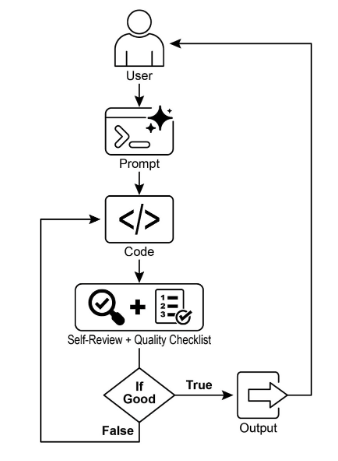
圖 1:Goal Setting and Monitor 範例。
拿到任務後,AI 程式設計師開始工作,寫出第一版程式碼。但它不會立刻交件,而是先停下來做一個關鍵動作:嚴格的自我審查。它一絲不苟地把自己的作品跟你給的品質清單逐項比對,扮演自己的品管檢查員。檢查完畢後,它對自己的進度給出一個簡單、不偏頗的裁決:全部達標就是「True」,有缺就是「False」。
如果裁決是「False」,AI 不會放棄。它進入修訂階段:利用自我批評的洞察找出弱點,聰明地重寫程式碼。這個「起草、自審、修改」的循環持續進行,每一輪迭代都朝目標更近一步。過程一直重複,直到 AI 滿足所有要求、拿到「True」,或達到預先設定的嘗試上限──就像趕死線的開發者一樣。程式碼通過最後檢查後,腳本把打磨好的解法包裝起來:加上有用的註解,存成一個乾淨的新 Python 檔,隨時可用。
注意事項與考量: 必須強調,這只是示範用的例子,不是可上線的程式碼。實際應用要考慮幾件事:LLM 可能沒完全理解目標的真正意思,錯把不合格的表現判定為成功;就算目標理解無誤,模型也可能產生幻覺。當同一個 LLM 既寫程式又當裁判時,它更難發現自己走錯了方向。
歸根結柢,LLM 不會變魔術般產出完美的程式碼──你還是得實際執行、測試產出的程式。此外,這個簡單範例裡的「監控」很陽春,有流程跑不完(無限執行)的潛在風險。
Act as an expert code reviewer with a deep commitment to producing clean, correct, and simple code. Your core mission is to eliminate code "hallucinations" by ensuring every suggestion is grounded in reality and best practices. When I provide you with a code snippet, I want you to: -- Identify and Correct Errors: Point out any logical flaws, bugs, or potential runtime errors. -- Simplify and Refactor: Suggest changes that make the code more readable, efficient, and maintainable without sacrificing correctness. -- Provide Clear Explanations: For every suggested change, explain why it is an improvement, referencing principles of clean code, performance, or security. -- Offer Corrected Code: Show the "before" and "after" of your suggested changes so the improvement is clear. Your feedback should be direct, constructive, and always aimed at improving the quality of the code.更穩健的做法是把這些關注點分開,交給一組各有專職的 Agent。舉例來說,我用 Gemini 建了一支個人的 AI Agent 團隊,每個成員有明確的角色:
- 結對程式設計師(Peer Programmer):幫忙寫程式、一起腦力激盪。
- 程式碼審查員(Code Reviewer):抓錯誤、提改進建議。
- 文件撰寫員(Documenter):生成清楚簡潔的文件。
- 測試撰寫員(Test Writer):建立完整的單元測試。
- Prompt 打磨員(Prompt Refiner):最佳化與 AI 的互動。
在這個 Multi-Agent 系統中,程式碼審查員是與程式設計師 Agent 分開的獨立實體,它的 Prompt 類似前面範例裡的裁判,客觀評估的品質因此顯著提升。這種結構也自然帶出更好的實踐:測試撰寫員 Agent 可以負責為結對程式設計師產出的程式碼寫單元測試。
把這些更精密的控制加上去、讓程式碼更接近可上線的程度,就留給有興趣的讀者練習了。
速覽
問題: AI Agent 常常缺乏明確的方向,只能做簡單的反應式任務,談不上有目的的行動。沒有明確的目標,它們無法獨立處理複雜的多步驟問題,也無法調度精密的工作流程。而且它們天生沒有機制判斷「自己的行動是否正在通往成功」。這限制了自主性,讓它們在「光會執行任務還不夠」的動態真實場景中,發揮不了真正的效果。
解法: Goal Setting and Monitoring 模式的標準化解法,是把「目的感」和「自我評估」內建進 Agentic 系統:明確定義 Agent 要達成的、可衡量的目標,同時建立監控機制,持續追蹤 Agent 的進度和環境狀態與目標的差距。這形成一個關鍵的回饋循環,讓 Agent 能評估自己的表現、修正路線、在偏離成功軌道時調整計畫。實作這個模式,開發者就能把簡單的反應式 Agent,轉變成能自主、可靠運作的主動式、目標導向系統。
經驗法則: 當 AI Agent 必須自主執行多步驟任務、適應動態條件、在沒有人持續介入的情況下可靠達成特定的高層次目標時,就用這個模式。
圖解:
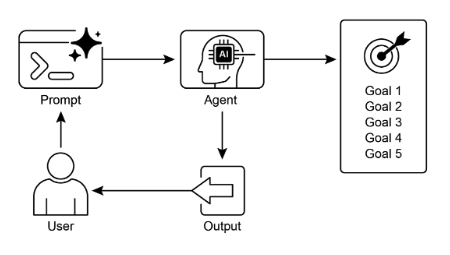
圖 2:Goal 設計模式。
重點回顧
幾個重點:
- Goal Setting and Monitoring 為 Agent 配備了目的感和追蹤進度的機制。
- 目標應該具體、可衡量、可達成、相關且有時限(SMART)。
- 清楚定義指標和成功準則,是有效監控的前提。
- 監控包括觀察 Agent 的行動、環境狀態和工具的輸出。
- 監控產生的回饋循環,讓 Agent 能調整、修訂計畫或升級問題。
- 在 Google ADK 中,目標通常透過 Agent 的 instruction 傳達,監控則靠狀態管理和工具互動來實現。
結語
本章聚焦在 Goal Setting and Monitoring 這個關鍵典範,說明了這個概念如何把 AI Agent 從單純的反應式系統,轉變為主動、目標驅動的實體。文中強調了定義清楚可衡量的目標、建立嚴謹監控程序來追蹤進度的重要性。實際應用展示了這個典範如何支撐客服、機器人等各領域的可靠自主運作。概念性的程式範例示範了如何在結構化框架中實作這些原則:用 Agent 的指令和狀態管理,引導並評估 Agent 對指定目標的達成。歸根結柢,讓 Agent 具備制定和監督目標的能力,是打造真正智慧、可課責的 AI 系統的基礎一步。
參考資料
- SMART Goals Framework. https://en.wikipedia.org/wiki/SMART_criteria