在複雜、多變的環境裡,Agent 常常要面對一大堆可能的行動、彼此衝突的目標,以及有限的資源。如果沒有一套明確的流程來決定下一步該做什麼,Agent 就容易效率低落、動作延遲,甚至無法達成關鍵目標。優先排序(Prioritization)模式正是為了解決這個問題:讓 Agent 根據重要性、急迫性、依賴關係與既定標準,來評估並排序各個任務、目標或行動。這樣一來,Agent 就能把力氣集中在最關鍵的任務上,做事更有效,也更貼近目標。
模式概觀
Agent 透過優先排序來有效管理任務、目標與子目標,並據此決定接下來的行動。這個過程能在面對多項需求時做出明智的判斷,讓重要或緊急的事情優先於次要的事情。在資源受限、時間有限、目標又可能互相衝突的真實情境裡,這一點特別重要。
Agent 的優先排序通常包含幾個核心要素。第一是標準定義,也就是先訂好評估任務的規則或指標。這些標準可能包括:急迫性(任務對時間的敏感程度)、重要性(對主要目標的影響)、依賴關係(這個任務是不是其他任務的前置條件)、資源可用性(需要的工具或資訊是否就緒)、成本效益分析(投入的心力對上預期的成果),以及個人化 Agent 會用到的使用者偏好。第二是任務評估,也就是拿每個候選任務去對照這些標準,方法可以從簡單的規則,一路到由 LLM(大型語言模型)做的複雜評分或推理。第三是排程或選擇邏輯,也就是根據評估結果,選出最佳的下一步行動或任務順序的演算法,過程中可能會用到佇列或更進階的規劃元件。最後是動態重新排序,讓 Agent 能在情況改變時調整優先順序,例如冒出新的關鍵事件或截止時間逼近,藉此保持適應力與反應力。
優先排序可以發生在不同層級:挑選一個總體目標(高層次的目標排序)、替計畫裡的步驟排順序(子任務排序),或是從當下可選項中挑出下一個立即行動(行動選擇)。做好優先排序,能讓 Agent 表現出更聰明、更有效率、也更穩健的行為,在複雜、多目標的環境裡尤其如此。這其實跟人類團隊的運作方式很像:主管會綜合所有成員的意見,來排定任務的優先順序。
實際應用與使用情境
在各種真實應用中,AI Agent 都展現了對優先排序相當成熟的運用,藉此做出及時又有效的決策。
- 自動化客戶服務:Agent 會優先處理緊急請求,例如系統故障回報,而把例行事項(如重設密碼)往後放。它們也可能對高價值客戶給予優先待遇。
- 雲端運算:AI 透過優先排序來管理與調度資源,在需求高峰時把資源優先分配給關鍵應用程式,並把較不緊急的批次作業挪到離峰時段執行,以降低成本。
- 自動駕駛系統:持續對各種行動做優先排序,以兼顧安全與效率。舉例來說,為了避免碰撞而煞車,優先於維持車道紀律或優化油耗。
- 金融交易:交易機器人會分析市場狀況、風險承受度、利潤空間與即時新聞等因素來決定交易的優先順序,讓高優先度的交易能迅速執行。
- 專案管理:AI Agent 會根據截止日期、依賴關係、團隊人力狀況與策略重要性,替專案看板上的任務排定優先順序。
- 資安:負責監控網路流量的 Agent 會評估威脅的嚴重程度、可能造成的衝擊,以及資產的關鍵性來排定警示的優先順序,確保對最危險的威脅立即做出回應。
- 個人助理 AI:運用優先排序來打理日常生活,依照使用者自訂的重要性、即將到來的截止時間與當下情境,來整理行事曆事件、提醒與通知。
這些例子合起來說明了一件事:能夠做優先排序,是 AI Agent 在各種情境下提升表現與決策能力的根本。
實作範例
以下示範如何用 LangChain 開發一個「專案經理」AI Agent。這個 Agent 負責建立任務、排定優先順序,並把任務指派給團隊成員,示範如何結合大型語言模型與量身打造的工具來自動化專案管理。
import os
import asyncio
from typing import List, Optional, Dict, Type

from dotenv import load_dotenv
from pydantic import BaseModel, Field
from langchain_core.prompts import ChatPromptTemplate
from langchain_core.tools import Tool
from langchain_openai import ChatOpenAI
from langchain.agents import AgentExecutor, create_react_agent
from langchain.memory import ConversationBufferMemory


# --- 0. Configuration and Setup ---
# Loads the OPENAI_API_KEY from the .env file.
load_dotenv()

# The ChatOpenAI client automatically picks up the API key from the environment.
llm = ChatOpenAI(temperature=0.5, model="gpt-4o-mini")


# --- 1. Task Management System ---
class Task(BaseModel):
    """Represents a single task in the system."""
    id: str
    description: str
    priority: Optional[str] = None  # P0, P1, P2
    assigned_to: Optional[str] = None  # Name of the worker


class SuperSimpleTaskManager:
    """An efficient and robust in-memory task manager."""

    def __init__(self):
        # Use a dictionary for O(1) lookups, updates, and deletions.
        self.tasks: Dict[str, Task] = {}
        self.next_task_id = 1

    def create_task(self, description: str) -> Task:
        """Creates and stores a new task."""
        task_id = f"TASK-{self.next_task_id:03d}"
        new_task = Task(id=task_id, description=description)
        self.tasks[task_id] = new_task
        self.next_task_id += 1
        print(f"DEBUG: Task created - {task_id}: {description}")
        return new_task

    def update_task(self, task_id: str, **kwargs) -> Optional[Task]:
        """Safely updates a task using Pydantic's model_copy."""
        task = self.tasks.get(task_id)
        if task:
            # Use model_copy for type-safe updates.
            update_data = {k: v for k, v in kwargs.items() if v is not None}
            updated_task = task.model_copy(update=update_data)
            self.tasks[task_id] = updated_task
            print(f"DEBUG: Task {task_id} updated with {update_data}")
            return updated_task

        print(f"DEBUG: Task {task_id} not found for update.")
        return None

    def list_all_tasks(self) -> str:
        """Lists all tasks currently in the system."""
        if not self.tasks:
            return "No tasks in the system."

        task_strings = []
        for task in self.tasks.values():
            task_strings.append(
                f"ID: {task.id}, Desc: '{task.description}', "
                f"Priority: {task.priority or 'N/A'}, "
                f"Assigned To: {task.assigned_to or 'N/A'}"
            )
        return "Current Tasks:\n" + "\n".join(task_strings)


task_manager = SuperSimpleTaskManager()


# --- 2. Tools for the Project Manager Agent ---
# Use Pydantic models for tool arguments for better validation and clarity.
class CreateTaskArgs(BaseModel):
    description: str = Field(description="A detailed description of the task.")


class PriorityArgs(BaseModel):
    task_id: str = Field(description="The ID of the task to update, e.g., 'TASK-001'.")
    priority: str = Field(description="The priority to set. Must be one of: 'P0', 'P1', 'P2'.")


class AssignWorkerArgs(BaseModel):
    task_id: str = Field(description="The ID of the task to update, e.g., 'TASK-001'.")
    worker_name: str = Field(description="The name of the worker to assign the task to.")


def create_new_task_tool(description: str) -> str:
    """Creates a new project task with the given description."""
    task = task_manager.create_task(description)
    return f"Created task {task.id}: '{task.description}'."


def assign_priority_to_task_tool(task_id: str, priority: str) -> str:
    """Assigns a priority (P0, P1, P2) to a given task ID."""
    if priority not in ["P0", "P1", "P2"]:
        return "Invalid priority. Must be P0, P1, or P2."
    task = task_manager.update_task(task_id, priority=priority)
    return f"Assigned priority {priority} to task {task.id}." if task else f"Task {task_id} not found."


def assign_task_to_worker_tool(task_id: str, worker_name: str) -> str:
    """Assigns a task to a specific worker."""
    task = task_manager.update_task(task_id, assigned_to=worker_name)
    return f"Assigned task {task.id} to {worker_name}." if task else f"Task {task_id} not found."


# All tools the PM agent can use
pm_tools = [
    Tool(
        name="create_new_task",
        func=create_new_task_tool,
        description="Use this first to create a new task and get its ID.",
        args_schema=CreateTaskArgs
    ),
    Tool(
        name="assign_priority_to_task",
        func=assign_priority_to_task_tool,
        description="Use this to assign a priority to a task after it has been created.",
        args_schema=PriorityArgs
    ),
    Tool(
        name="assign_task_to_worker",
        func=assign_task_to_worker_tool,
        description="Use this to assign a task to a specific worker after it has been created.",
        args_schema=AssignWorkerArgs
    ),
    Tool(
        name="list_all_tasks",
        func=task_manager.list_all_tasks,
        description="Use this to list all current tasks and their status."
    ),
]


# --- 3. Project Manager Agent Definition ---
pm_prompt_template = ChatPromptTemplate.from_messages([
    ("system", """You are a focused Project Manager LLM agent. Your goal is to manage project tasks efficiently.
      When you receive a new task request, follow these steps:
    1.  First, create the task with the given description using the `create_new_task` tool. You must do this first to get a `task_id`.
    2.  Next, analyze the user's request to see if a priority or an assignee is mentioned.
        - If a priority is mentioned (e.g., "urgent", "ASAP", "critical"), map it to P0. Use `assign_priority_to_task`.
        - If a worker is mentioned, use `assign_task_to_worker`.
    3.  If any information (priority, assignee) is missing, you must make a reasonable default assignment (e.g., assign P1 priority and assign to 'Worker A').
    4.  Once the task is fully processed, use `list_all_tasks` to show the final state.

    Available workers: 'Worker A', 'Worker B', 'Review Team'
    Priority levels: P0 (highest), P1 (medium), P2 (lowest)
    """),
    ("placeholder", "{chat_history}"),
    ("human", "{input}"),
    ("placeholder", "{agent_scratchpad}")
])

# Create the agent executor
pm_agent = create_react_agent(llm, pm_tools, pm_prompt_template)
pm_agent_executor = AgentExecutor(
    agent=pm_agent,
    tools=pm_tools,
    verbose=True,
    handle_parsing_errors=True,
    memory=ConversationBufferMemory(memory_key="chat_history", return_messages=True)
)


# --- 4. Simple Interaction Flow ---
async def run_simulation():
    print("--- Project Manager Simulation ---")

    # Scenario 1: Handle a new, urgent feature request
    print("\n[User Request] I need a new login system implemented ASAP. It should be assigned to Worker B.")
    await pm_agent_executor.ainvoke({"input": "Create a task to implement a new login system. It's urgent and should be assigned to Worker B."})

    print("\n" + "-" * 60 + "\n")

    # Scenario 2: Handle a less urgent content update with fewer details
    print("[User Request] We need to review the marketing website content.")
    await pm_agent_executor.ainvoke({"input": "Manage a new task: Review marketing website content."})

    print("\n--- Simulation Complete ---")


# Run the simulation
if __name__ == "__main__":
    asyncio.run(run_simulation())
這段程式用 Python 和 LangChain 實作了一個簡單的任務管理系統,目的是模擬一個由大型語言模型驅動的專案經理 Agent。
系統用 SuperSimpleTaskManager 類別在記憶體裡高效管理任務,底層用字典結構來快速取用資料。每個任務由一個 Task Pydantic 模型表示,包含唯一識別碼、描述文字、可選的優先度(P0、P1、P2),以及可選的指派對象等屬性。記憶體用量會隨任務類型、工作人員數量與其他因素而變動。任務管理器提供了建立任務、修改任務,以及取回所有任務的方法。
Agent 透過一組定義好的工具(Tool)與任務管理器互動。這些工具讓它可以建立新任務、替任務指定優先度、把任務指派給人員,以及列出所有任務。每個工具都被封裝起來,用來操作某個 SuperSimpleTaskManager 實例。工具所需的參數則用 Pydantic 模型來描述,藉此確保資料驗證。
AgentExecutor 會搭配語言模型、工具集,以及一個對話記憶元件來設定,藉此維持上下文的連貫。程式裡定義了一個專屬的 ChatPromptTemplate,用來引導 Agent 扮演好專案經理的角色。這個 Prompt 指示 Agent 先建立任務,接著依照指定內容指派優先度與人員,最後再列出完整的任務清單。當資訊缺漏時,Prompt 裡也規定了預設值,例如 P1 優先度與 ‘Worker A’。
程式裡還有一個非同步的模擬函式(run_simulation),用來展示 Agent 的實際運作。這個模擬會跑兩個不同的情境:一個是處理指定了人員的緊急任務,另一個是處理輸入資訊很少的非緊急任務。由於 AgentExecutor 裡開了 verbose=True,Agent 的動作與思考過程都會輸出到主控台。
速覽
問題: 在複雜環境裡運作的 AI Agent,會面對一大堆可能的行動、彼此衝突的目標,以及有限的資源。如果沒有一套清楚的方法來決定下一步,這些 Agent 就有可能變得沒效率、沒成效,甚至造成嚴重的動作延遲,或是徹底無法完成主要目標。核心的挑戰在於:怎麼駕馭數量龐大的選項,確保 Agent 行事有目的、有邏輯。
解法: 優先排序模式讓 Agent 對任務與目標進行排序,為這個問題提供了一套標準化的解法。做法是先訂出明確的標準,例如急迫性、重要性、依賴關係與資源成本,接著 Agent 拿每個候選行動去對照這些標準,決定出最關鍵、最及時的做法。這種 Agentic 能力讓系統可以隨著環境變化動態調整,並有效管理受限的資源。透過聚焦在優先度最高的項目上,Agent 的行為會變得更聰明、更穩健,也更貼合它的策略目標。
經驗法則: 當一個 Agentic 系統必須在資源受限的情況下,自主管理多項(往往還互相衝突的)任務或目標,才能在多變環境中有效運作時,就適合採用優先排序模式。
圖解:
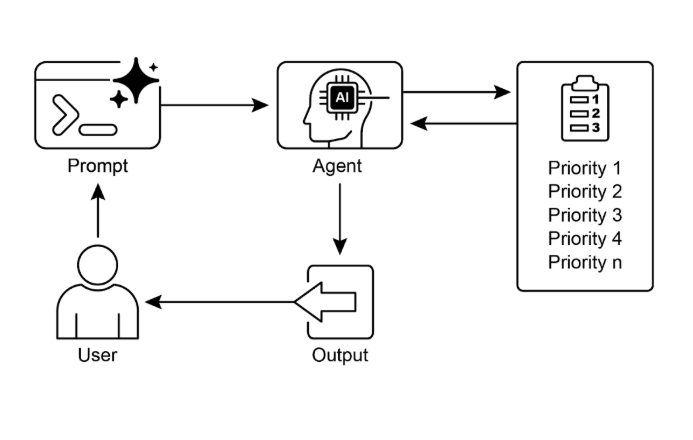
圖 1:優先排序設計模式
重點回顧
- 優先排序讓 AI Agent 能在複雜、多面向的環境裡有效運作。
- Agent 會運用既定的標準(例如急迫性、重要性與依賴關係)來評估並排序任務。
- 動態重新排序讓 Agent 能因應即時變化,調整當下要專注處理的事情。
- 優先排序發生在不同層級,涵蓋總體的策略目標,也涵蓋當下的戰術決策。
- 做好優先排序,能提升 AI Agent 的效率,也讓運作更穩健。
結語
總的來說,優先排序模式是有效 Agentic AI 的基石,讓系統能夠有目的、有智慧地應對多變環境的種種複雜。它讓 Agent 能自主評估大量互相衝突的任務與目標,理性地決定把有限的資源集中在哪裡。這種 Agentic 能力已經超越了單純的任務執行,讓系統能扮演一個主動、具策略眼光的決策者。透過權衡急迫性、重要性與依賴關係等標準,Agent 展現出一種細膩、近似人類的推理過程。
這種 Agentic 行為的一個關鍵特點,就是動態重新排序:它賦予 Agent 自主權,能在條件改變時即時調整關注的重心。正如程式範例所示,Agent 會解讀含糊的請求,自主挑選並使用合適的工具,再合乎邏輯地安排行動順序,來達成它的目標。這種自我管理工作流程的能力,正是真正的 Agentic 系統與單純自動化腳本的差別所在。歸根到底,掌握優先排序,是打造出能在任何複雜真實情境中有效、可靠運作的穩健且聰明 Agent 的根本。
參考資料
- Examining the Security of Artificial Intelligence in Project Management: A Case Study of AI-driven Project Scheduling and Resource Allocation in Information Systems Projects ; https://www.irejournals.com/paper-details/1706160
- AI-Driven Decision Support Systems in Agile Software Project Management: Enhancing Risk Mitigation and Resource Allocation; https://www.mdpi.com/2079-8954/13/3/208